> ## Documentation Index
> Fetch the complete documentation index at: https://docs.phbhealth.com/llms.txt
> Use this file to discover all available pages before exploring further.
# Register a patient at the desk
> Create a new PHB record at the front desk, with a code read back from the patient's phone or as a provisional record.
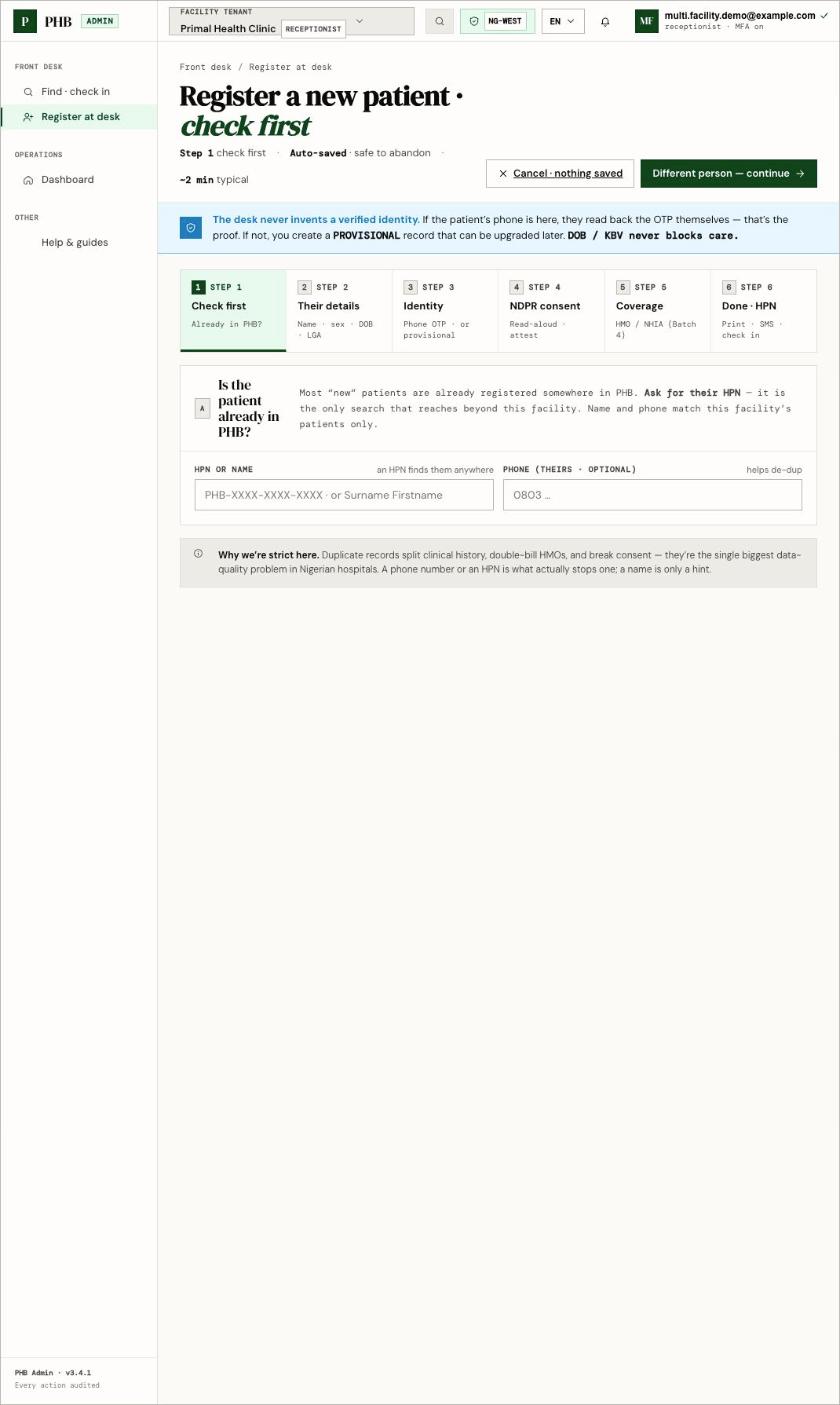
The desk never invents a verified identity. Either the patient reads back a code sent to their own phone, or they get a clearly marked **provisional** record. Missing details never block care.
## Before you start
You need:
* The role `receptionist` (or `owner` or `admin`).
* The patient in front of you.
Always check first whether the patient already has PHB. A second HPN splits their record and can't be merged yet.
 ## Steps
Open **Register at desk** (`/hospital/desk/register`). The wizard saves as you go, so it is safe to stop.
**Ask for their HPN.** Search by HPN or name, and their phone if they have one. If there is **No match here — that does not mean they are new to PHB.** If they say they have PHB, use **They already have PHB** on this screen. See [They already have PHB](/guides/front-desk/they-already-have-phb).
Name, sex, date of birth and LGA. If they don't know their exact date of birth, mark it **Estimated**.
Choose one:
* **Phone code:** click **Send code**. The patient reads back the code from their phone. Their record is verified by phone.
* **No phone today:** create a provisional record. You can add a phone later.
Read the consent script aloud and confirm the patient agreed. You must do this before the record is created.
This step is not available yet. Add HMO coverage later from the patient's coverage view.
Click **Create record · issue HPN**. Print the HPN slip, and check the patient in.
## What you can do here
* Register adults, and children under a guardian.
* Print an HPN slip for the patient.
* Record the registration fee if your facility takes it at reception.
## What a provisional record limits
A provisional record shows **Limited until verified**: no HMO claims, no cross-hospital sharing and no app login. The patient still gets care. See [Upgrade a provisional record](/guides/front-desk/upgrade-a-provisional-record).
## Common problems
| What you see | What to do |
| - | - |
| **That code is incorrect.** | Ask the patient to read it again, or click **Resend**. |
| **Record the patient's NDPR consent before creating the record.** | Complete the consent step. |
| **The duplicate check did not run.** | Try the check again before creating a record. |
| **Registration fee already settled** | The fee was paid elsewhere, such as at the cashier. Nothing more to collect. |
| **Registration is a reception task** | Your role can't register patients. Ask your owner or admin. |
This documentation is built and hosted on [Mintlify](https://mintlify.com), a developer documentation platform.
## Steps
Open **Register at desk** (`/hospital/desk/register`). The wizard saves as you go, so it is safe to stop.
**Ask for their HPN.** Search by HPN or name, and their phone if they have one. If there is **No match here — that does not mean they are new to PHB.** If they say they have PHB, use **They already have PHB** on this screen. See [They already have PHB](/guides/front-desk/they-already-have-phb).
Name, sex, date of birth and LGA. If they don't know their exact date of birth, mark it **Estimated**.
Choose one:
* **Phone code:** click **Send code**. The patient reads back the code from their phone. Their record is verified by phone.
* **No phone today:** create a provisional record. You can add a phone later.
Read the consent script aloud and confirm the patient agreed. You must do this before the record is created.
This step is not available yet. Add HMO coverage later from the patient's coverage view.
Click **Create record · issue HPN**. Print the HPN slip, and check the patient in.
## What you can do here
* Register adults, and children under a guardian.
* Print an HPN slip for the patient.
* Record the registration fee if your facility takes it at reception.
## What a provisional record limits
A provisional record shows **Limited until verified**: no HMO claims, no cross-hospital sharing and no app login. The patient still gets care. See [Upgrade a provisional record](/guides/front-desk/upgrade-a-provisional-record).
## Common problems
| What you see | What to do |
| - | - |
| **That code is incorrect.** | Ask the patient to read it again, or click **Resend**. |
| **Record the patient's NDPR consent before creating the record.** | Complete the consent step. |
| **The duplicate check did not run.** | Try the check again before creating a record. |
| **Registration fee already settled** | The fee was paid elsewhere, such as at the cashier. Nothing more to collect. |
| **Registration is a reception task** | Your role can't register patients. Ask your owner or admin. |
This documentation is built and hosted on [Mintlify](https://mintlify.com), a developer documentation platform.