> ## Documentation Index
> Fetch the complete documentation index at: https://docs.phbhealth.com/llms.txt
> Use this file to discover all available pages before exploring further.
# Find and check in a patient
> Search for a patient at the desk and check in a booked visit.
## Before you start
You need the role `receptionist` (or `owner` or `admin`). Sign in at `/hospital/login`.
 ## Steps
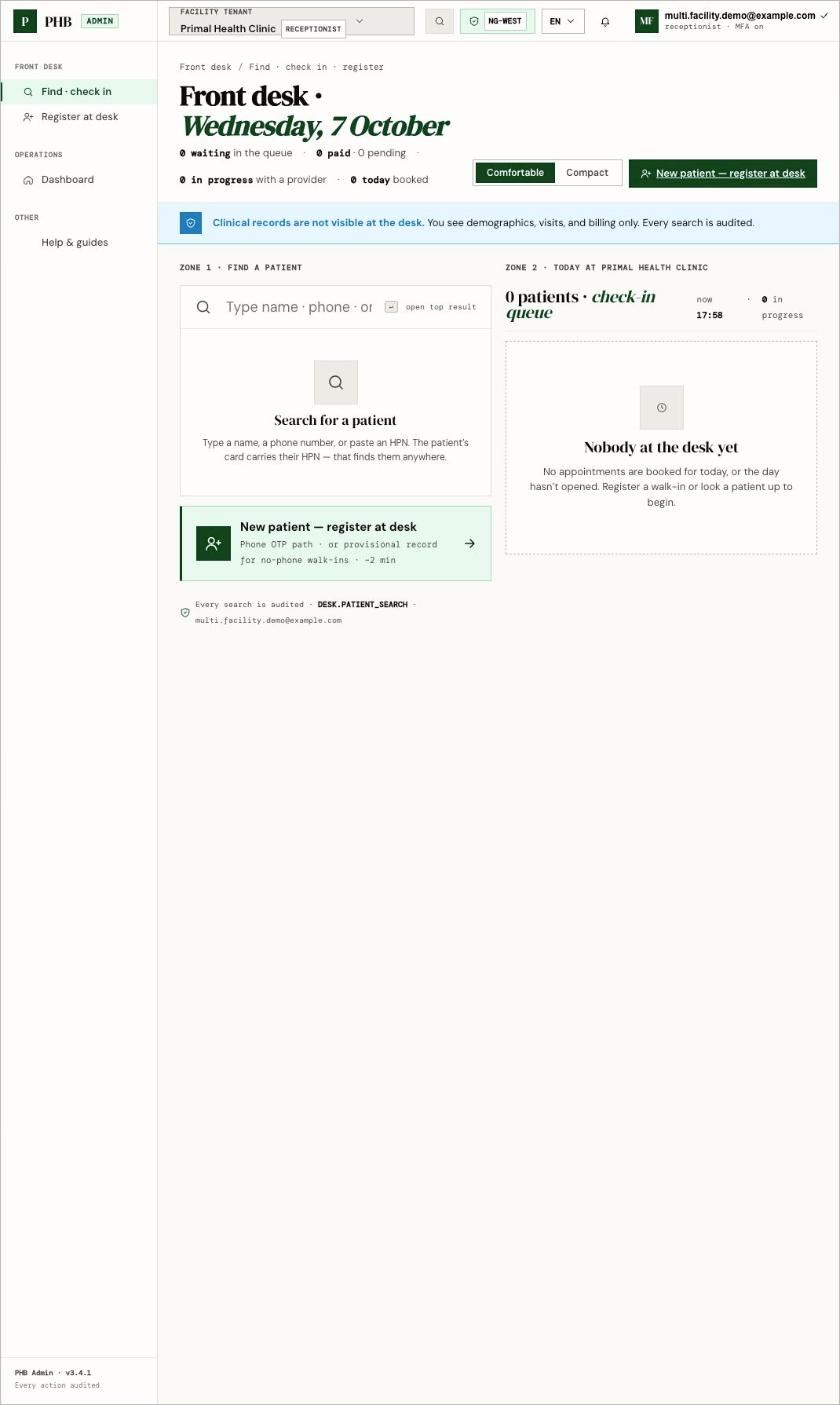
Click **Find · check in** on `/hospital`. This opens `/hospital/desk`.
Under **Search for a patient**, type a name, phone number or HPN. HPNs format themselves as you type.
A row shows the patient's name, whether they are **Provisional** or **Verified**, and their last visit here. A **possible duplicates** panel appears if PHB sees records that look alike. Check with the patient before you pick one.
In the **Today** queue, find the patient's booking and click **Check in**. The status changes from **Booked** to **Checked in**.
For a pay-at-desk visit, click **Send to cashier**.
## What you can do here
* Find patients by name, phone or full HPN.
* Check in booked visits, and mark **No-show**.
* Start a walk-in visit. See [Walk-ins](/guides/front-desk/walk-ins).
* Open a patient's desk page to upgrade a provisional record.
* Register a new patient with **New patient — register at desk**.
## Common problems
| What you see | Why | What to do |
| - | - | - |
| **No match at this facility** | Name and phone search only finds patients who have been to your facility before. | **This is not a "patient not found".** If the patient says they have PHB, use [They already have PHB](/guides/front-desk/they-already-have-phb). |
| **No PHB patient with that HPN** | The HPN doesn't exist. | Check the digits on the patient's slip or app. |
| **Search unavailable** | PHB couldn't run the search. | Try again. Don't register the patient again just because search failed. |
| **The front desk isn't part of your role** | You don't hold `receptionist`, `owner` or `admin`. | Ask your owner or admin. |
This documentation is built and hosted on [Mintlify](https://mintlify.com), a developer documentation platform.
## Steps
Click **Find · check in** on `/hospital`. This opens `/hospital/desk`.
Under **Search for a patient**, type a name, phone number or HPN. HPNs format themselves as you type.
A row shows the patient's name, whether they are **Provisional** or **Verified**, and their last visit here. A **possible duplicates** panel appears if PHB sees records that look alike. Check with the patient before you pick one.
In the **Today** queue, find the patient's booking and click **Check in**. The status changes from **Booked** to **Checked in**.
For a pay-at-desk visit, click **Send to cashier**.
## What you can do here
* Find patients by name, phone or full HPN.
* Check in booked visits, and mark **No-show**.
* Start a walk-in visit. See [Walk-ins](/guides/front-desk/walk-ins).
* Open a patient's desk page to upgrade a provisional record.
* Register a new patient with **New patient — register at desk**.
## Common problems
| What you see | Why | What to do |
| - | - | - |
| **No match at this facility** | Name and phone search only finds patients who have been to your facility before. | **This is not a "patient not found".** If the patient says they have PHB, use [They already have PHB](/guides/front-desk/they-already-have-phb). |
| **No PHB patient with that HPN** | The HPN doesn't exist. | Check the digits on the patient's slip or app. |
| **Search unavailable** | PHB couldn't run the search. | Try again. Don't register the patient again just because search failed. |
| **The front desk isn't part of your role** | You don't hold `receptionist`, `owner` or `admin`. | Ask your owner or admin. |
This documentation is built and hosted on [Mintlify](https://mintlify.com), a developer documentation platform.