> ## Documentation Index
> Fetch the complete documentation index at: https://docs.phbhealth.com/llms.txt
> Use this file to discover all available pages before exploring further.
# Patient sign-in
> Three ways a patient signs in at /login: a phone code, an HPN and password, or a passkey.
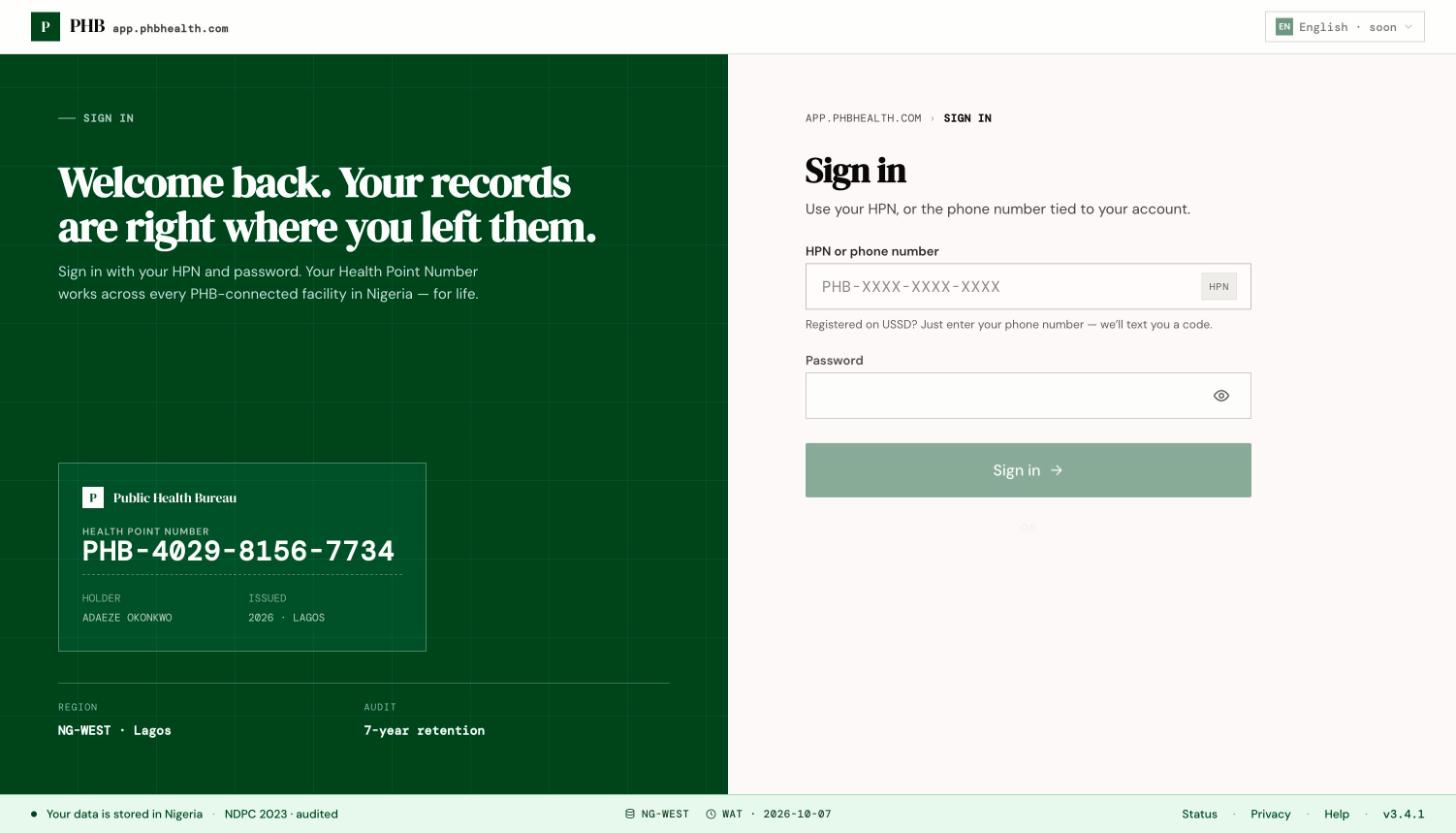
Patients sign in at `/login`. There are three ways in. Use whichever is easiest.
 ## Before you start
You need a PHB account. If you don't have one, see [Register as a patient](/account/register-as-a-patient).
## Steps
### With your phone number
On `/login`, type the mobile number tied to your account and click **Send code**.
PHB texts you a code. Type it in. SMS can take a minute to arrive.
You land on **Home** (`/home`).
### With your HPN and password
Type your HPN in the same box. The dashes are added for you.
Enter the password you set, then click **Sign in**.
### With a passkey
Click **Use a passkey on this device**. Your phone or computer asks for your fingerprint, face or screen lock. You need to have added a passkey first. See [Passwords and passkeys](/account/passwords-and-passkeys).
## What you can do here
* Sign in with any of the three methods.
* Click **Create an HPN** to register.
* Click **Forgot your HPN, or lost your SIM?** to recover your account.
## Common problems
| What you see | Why | What to do |
| - | - | - |
| **That HPN isn't valid — check the digits and try again.** | A digit was typed wrong. PHB checks the number before sending it. | Check the number on your Home page or registration slip. |
| **Enter a valid Nigerian mobile number, or use your HPN.** | The phone number format wasn't recognised. | Check the number, or use your HPN. |
| **You're going too fast — wait a moment and try again.** | Too many tries in a short time. | Wait a little, then try again. |
| You were taken to a "locked" page | Too many wrong passwords. | Wait for the time shown, or sign in with your phone code instead. |
| **This browser doesn't support passkeys.** | Your browser is too old or doesn't support passkeys. | Use your phone number or HPN. |
| No code arrives | SMS delay, or the number isn't on your account. | Wait a minute and click resend. If you lost your SIM, see [Recover your HPN or SIM](/account/recover-your-hpn-or-sim). |
| You were signed out while reading | Patient sessions lock after a short idle time. | Sign in again. See [Sessions and timeouts](/account/sessions-and-timeouts). |
This documentation is built and hosted on [Mintlify](https://mintlify.com), a developer documentation platform.
## Before you start
You need a PHB account. If you don't have one, see [Register as a patient](/account/register-as-a-patient).
## Steps
### With your phone number
On `/login`, type the mobile number tied to your account and click **Send code**.
PHB texts you a code. Type it in. SMS can take a minute to arrive.
You land on **Home** (`/home`).
### With your HPN and password
Type your HPN in the same box. The dashes are added for you.
Enter the password you set, then click **Sign in**.
### With a passkey
Click **Use a passkey on this device**. Your phone or computer asks for your fingerprint, face or screen lock. You need to have added a passkey first. See [Passwords and passkeys](/account/passwords-and-passkeys).
## What you can do here
* Sign in with any of the three methods.
* Click **Create an HPN** to register.
* Click **Forgot your HPN, or lost your SIM?** to recover your account.
## Common problems
| What you see | Why | What to do |
| - | - | - |
| **That HPN isn't valid — check the digits and try again.** | A digit was typed wrong. PHB checks the number before sending it. | Check the number on your Home page or registration slip. |
| **Enter a valid Nigerian mobile number, or use your HPN.** | The phone number format wasn't recognised. | Check the number, or use your HPN. |
| **You're going too fast — wait a moment and try again.** | Too many tries in a short time. | Wait a little, then try again. |
| You were taken to a "locked" page | Too many wrong passwords. | Wait for the time shown, or sign in with your phone code instead. |
| **This browser doesn't support passkeys.** | Your browser is too old or doesn't support passkeys. | Use your phone number or HPN. |
| No code arrives | SMS delay, or the number isn't on your account. | Wait a minute and click resend. If you lost your SIM, see [Recover your HPN or SIM](/account/recover-your-hpn-or-sim). |
| You were signed out while reading | Patient sessions lock after a short idle time. | Sign in again. See [Sessions and timeouts](/account/sessions-and-timeouts). |
This documentation is built and hosted on [Mintlify](https://mintlify.com), a developer documentation platform.